Geometric Patterns – Digital Paper: A Practical Guide for Designers and Makers
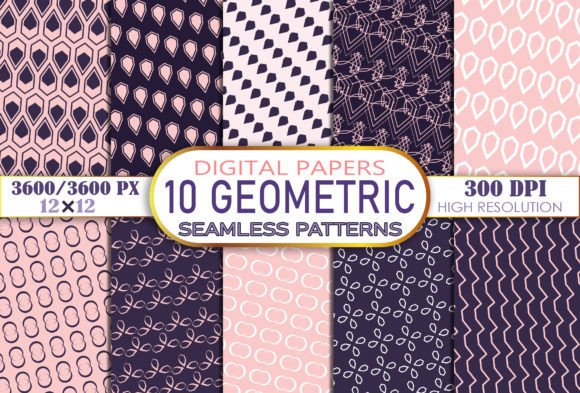
Geometric Patterns – Digital Paper refers to a curated set of high-resolution, print-ready digital files designed specifically for creative applications that demand precision, consistency, and visual impact. Unlike generic clipart or low-res stock graphics, this collection is built around intentional repetition, symmetry, and proportion—hallmarks of geometric design language. Each file is delivered as a 12″ × 12″ JPEG at 300 DPI (3600 × 3600 pixels), making it suitable for both screen-based projects and professional-grade physical output.
What Sets This Collection Apart
The distinction lies not just in resolution—but in purpose-built utility. Geometric Patterns – Digital Paper is structured for immediate integration into real-world workflows. The 10 included designs are not random motifs; they represent balanced variations in scale, density, line weight, and negative space. Some emphasize tight tessellations ideal for fabric repeats, while others use open layouts better suited for journal covers or website backgrounds. All maintain consistent color neutrality (RGB and CMYK-safe palettes) and avoid embedded watermarks or layered effects that complicate editing.
This contrasts with many free or subscription-based pattern libraries where files may be cropped, scaled inconsistently, or optimized only for web display (72–150 DPI). It also differs from vector-based pattern packs, which offer scalability but require familiarity with software like Adobe Illustrator to adjust colors or spacing. Geometric Patterns – Digital Paper prioritizes accessibility: open the ZIP, extract the JPEGs, and use them directly in Canva, Procreate, Cricut Design Space, or even Microsoft Word—no conversion needed.
How It Compares Across Common Use Cases
When evaluating resources for specific tasks, understanding functional fit matters more than pixel count alone. Here’s how Geometric Patterns – Digital Paper aligns—or diverges—with alternatives:
- For print-heavy projects like invitations, planner covers, or gift wrap: Its 300 DPI resolution ensures crisp edges and smooth gradients when printed on matte or glossy paper. Vector alternatives may scale infinitely, but raster files at this resolution match most commercial printers’ expectations without requiring preflight adjustments.
- For craft applications like bottle caps, nail wraps, or magnets: The 12″ × 12″ size allows flexible cropping. You can isolate a 2″ × 2″ section for a nail wrap or tile the full image across a 8.5″ × 11″ sheet for magnet backing. Free pattern sites often provide smaller tiles (e.g., 4″ × 4″) that repeat visibly—less ideal for small-format items where seamlessness matters.
- For digital-first work like website backgrounds or social media templates: While web displays rarely need 300 DPI, having high-res source files gives flexibility. You can downsample cleanly for retina displays or export multiple sizes without interpolation artifacts. In contrast, starting from a 72 DPI file limits future adaptability.
- For textile or surface design: Though not seamless by default, several patterns in the set are constructed with repeat-friendly alignment—meaning minimal manual tiling is needed in Photoshop or Affinity Designer. Seamless vector packs offer automatic tiling, but raster versions give faster previewing and broader compatibility across platforms.
Strengths and Realistic Tradeoffs
The primary strength of Geometric Patterns – Digital Paper is its balance of quality, simplicity, and versatility. Because each file is a standalone JPEG, there’s no learning curve tied to file formats, licensing tiers, or platform restrictions. You own the files outright and can use them across personal, freelance, or small-business contexts—as long as usage complies with standard commercial licenses (e.g., no reselling the files as-is).
That said, tradeoffs exist. JPEG format means no transparency—so if you need overlays or cutouts (e.g., for vinyl decals), you’ll need to manually mask or convert in editing software. Vector-based alternatives support alpha channels and infinite scaling, but introduce complexity for users unfamiliar with path manipulation. Also, while the 10 designs cover foundational geometric styles—triangles, hexagons, chevrons, grids, and concentric shapes—they don’t include animated variants, metallic textures, or photorealistic hybrids. That’s intentional: this is a focused toolkit, not an exhaustive library.
When It Fits—and When It Might Not
Geometric Patterns – Digital Paper tends to be the right choice when your priority is reliability over customization. For example:
- A teacher designing printable classroom posters who needs clean, legible backgrounds without worrying about software compatibility.
- A small-batch jewelry maker creating branded packaging inserts and needing consistent, reproducible texture across labels and boxes.
- A freelance graphic designer building a client’s brand kit and wanting to deliver production-ready assets alongside mockups.
It may be less suitable if your workflow depends heavily on dynamic recoloring or responsive resizing. If you regularly change palette schemes per project, a vector pack with global swatches—or a parametric tool like Patternodes—offers more agility. Similarly, if you’re developing a large-scale branding system requiring hundreds of coordinated patterns, a custom commission or subscription service with broader variety may better serve long-term needs.
Practical Integration Tips
Getting the most from Geometric Patterns – Digital Paper involves more than drag-and-drop. Consider these realistic practices:
- Test before committing: Print a single 4″ × 4″ sample on your target paper stock. Ink absorption and brightness vary widely—even at 300 DPI, results differ between uncoated newsprint and premium linen cardstock.
- Tile thoughtfully: For large surfaces like notebooks or phone cases, use “offset” or “define pattern” functions in Photoshop or GIMP to preview how edges align. Some geometric arrangements reveal subtle misalignments only when repeated.
- Adjust for medium: A pattern that reads clearly at 12″ × 12″ may feel overwhelming on a 1.5″ × 1.5″ bottle cap. Crop tightly or reduce opacity slightly to preserve legibility.
- Layer intentionally: Combine one geometric background with a subtle texture overlay (e.g., fine grain or soft noise) to add depth without sacrificing clarity—especially useful for digital albums or presentation decks.
Final Considerations for Informed Decisions
Choosing digital paper isn’t just about aesthetics—it’s about matching technical specs to your output chain, team capacity, and long-term reuse goals. Geometric Patterns – Digital Paper excels where clarity, consistency, and ease-of-use intersect. It avoids over-engineering while delivering what most makers actually need: dependable, high-fidelity files that behave predictably across tools and substrates.
If your current process involves stitching together fragments from multiple sources—or compromising resolution to meet platform constraints—this collection offers a streamlined alternative. But if your work demands deep interactivity, AI-assisted generation, or multi-layered compositing, evaluate whether a hybrid approach (e.g., using these as base textures within a larger vector or PSD workflow) might bridge the gap more effectively than substitution alone.
Ultimately, the value of Geometric Patterns – Digital Paper emerges not in isolation, but in how it fits your existing habits, tools, and intentions—without asking you to change them.