Assorted Black and White Patterns: A Practical Resource for Design, Print, and Digital Workflow
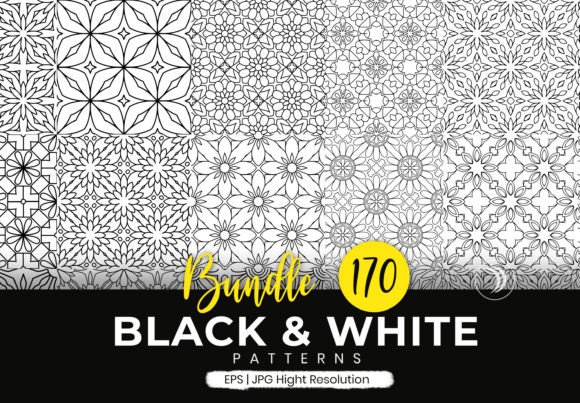
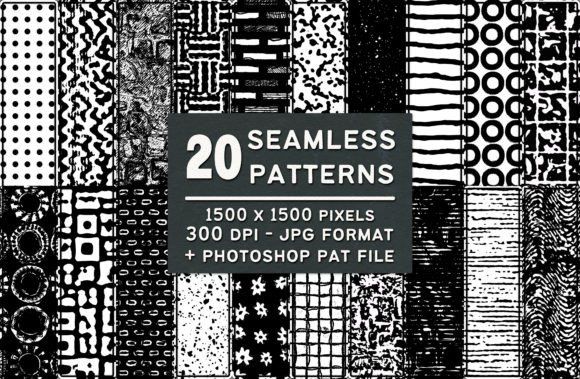
Assorted Black and White Patterns is a curated set of 20 seamless, high-resolution tiling patterns—each sized at 1500 × 1500 pixels, delivered at 300 dpi in JPG format, and bundled into a single Photoshop .pat file. It’s not just a collection of visuals; it’s a workflow-ready asset designed to integrate cleanly into real-world creative and production processes. Whether you’re preparing marketing collateral, designing learning materials, building brand assets, or prototyping print layouts, this set supports consistency, speed, and visual clarity without sacrificing quality.
Where These Patterns Fit Into Your Workflow
Patterns like these rarely exist in isolation—they’re part of a larger sequence of decisions and actions. You might reach for Assorted Black and White Patterns before finalizing a layout to test contrast, texture, and hierarchy; during a design sprint to rapidly iterate background treatments across slides, web banners, or packaging mockups; or after content is locked, to add subtle depth to exported PDFs, social media thumbnails, or printed handouts.
For educators building course workbooks, the monochrome nature ensures readability when photocopied or viewed on low-contrast screens. For marketers running A/B tests on email headers, swapping one pattern for another takes seconds—not hours—thanks to the seamless tiling and uniform sizing. Small business owners updating their stationery can apply the same pattern across business cards, letterheads, and invoice footers with confidence that alignment and scale remain consistent.
Compatibility and Integration Across Tools
The dual-format delivery—JPG + Photoshop .pat—means Assorted Black and White Patterns bridges platforms and skill levels. The JPG files drop directly into Canva, Figma, Illustrator, InDesign, PowerPoint, or Google Slides without conversion. No plugins, no rendering delays, no transparency issues. Because they’re 300 dpi and 1500 × 1500, they scale cleanly up to A4 or letter size without pixelation—even when printed on premium stock.
The Photoshop .pat file unlocks deeper integration for users who rely on Adobe Creative Cloud. Once loaded, each pattern becomes available in the Fill dialog (Shift + F5), Layer Style > Pattern Overlay, or as a custom brush texture. This means you can apply a pattern non-destructively, adjust opacity and blend mode per layer, and reuse it across multiple documents without re-importing files. It also enables quick toggling between patterns during client reviews—no need to manage separate image layers or worry about misaligned tiles.
Practical Implementation Tips
Start by viewing all previews before downloading or installing. Not every pattern suits every use case—and seeing them in context helps avoid assumptions. A dense crosshatch may anchor a technical diagram but overwhelm body text; a soft dot grid may enhance a minimalist brochure but disappear on textured paper. Use the previews to map patterns to your project’s functional needs—not just aesthetics.
- For print projects: Apply patterns as underlays beneath light-colored text blocks to improve legibility without adding color complexity. Test on your target output device first—some laser printers compress fine lines, making certain patterns appear heavier than intended.
- In digital presentations: Use lighter patterns (e.g., subtle noise or faint concentric circles) behind key metrics or quotes to create gentle visual separation from solid backgrounds—without triggering motion sensitivity or accessibility concerns.
- In branding systems: Assign one pattern as a “texture anchor”—for example, using the same diagonal line motif across slide decks, report covers, and webinar backgrounds. This builds subconscious recognition while keeping color palettes flexible.
Efficiency Without Compromise
Time saved isn’t just about faster clicks—it’s about reducing decision fatigue. When you have 20 distinct, production-ready patterns at hand, you eliminate the need to generate, test, and tweak custom textures from scratch. That’s valuable whether you’re a freelancer juggling three client revisions before noon, an educator prepping weekly lesson kits, or a product manager documenting internal process flows.
Each pattern is built to tile seamlessly, so there’s no manual alignment, no visible seams at edges, and no risk of mismatched repeats when scaling across large canvases. That reliability reduces QA time—especially important when collaborating across teams where file handoffs can introduce version mismatches or resampling errors.
Organization and Long-Term Usability
Store the JPGs in a clearly labeled subfolder within your asset library (e.g., /Assets/Textures/BlackWhite_Patterns/) and name each file descriptively: bw-dotted-grid.jpg, bw-organic-squiggle.jpg. This makes them searchable in DAM tools and intuitive to locate months later—even if you’re revisiting a project after a seasonal break.
The Photoshop .pat file should be installed once, then treated like any other system-level resource. Keep a backup copy outside your Photoshop presets folder (e.g., in cloud storage or local archive) so reinstalling software or switching machines doesn’t disrupt access. If you work across Windows and macOS, verify the .pat loads correctly on both—Adobe handles cross-platform compatibility well, but testing prevents surprises during tight deadlines.
Quality Control and Real-World Testing
Because all patterns are delivered at 300 dpi and identical dimensions, you can batch-process them in bulk—applying sharpening, adjusting levels, or converting to CMYK—without scripting or third-party tools. That uniformity also simplifies quality control: if one pattern renders cleanly in your PDF export settings, the rest will too.
Test patterns in actual usage scenarios, not just preview windows. Try printing a full-page sample on your office printer. Drop one into a Figma auto-layout frame and resize it to mobile, tablet, and desktop breakpoints. Paste it into a Word document and export as PDF/A for archival compliance. These small validations reveal how the patterns behave where it matters—not just in theory.
Workflow Synergy With Other Resources
Assorted Black and White Patterns works best when paired with intentional structure elsewhere. Combine it with a modular grid system to ensure pattern placement reinforces information hierarchy. Pair it with a typography scale to maintain rhythm between texture and text. Use it alongside a documented brand guideline—not as decoration, but as a functional element that supports tone (e.g., a rigid geometric pattern reinforcing precision; a hand-drawn scribble pattern supporting approachability).
If you use AI-assisted tools for ideation or layout suggestions, feed them prompts referencing specific patterns (“apply the same rhythm as bw-diagonal-hatch”) rather than vague terms like “textured background.” That specificity yields more predictable, reusable outputs.
Moving Beyond Decoration
These patterns aren’t filler. They serve functional roles: guiding the eye, separating sections, signaling category differences, reducing visual noise, or adding tactile warmth to flat digital interfaces. A well-chosen black-and-white pattern can make a data visualization easier to parse, help learners distinguish between concept types in a worksheet, or give a startup pitch deck a grounded, confident feel—without relying on color psychology or licensing constraints.
That neutrality is strategic. It means Assorted Black and White Patterns stays relevant across changing trends, platform updates, or team transitions. You won’t outgrow it because it doesn’t chase novelty—it solves enduring problems: consistency, clarity, and execution speed.
Getting Started Tomorrow
You don’t need to overhaul your process to benefit. Pick one upcoming task—maybe formatting a quarterly report, prepping a workshop handout, or refreshing a landing page section—and use one pattern intentionally. Apply it, assess how it affects readability and flow, note what worked and what didn’t, and adjust next time. That iterative, grounded approach is how practical resources like Assorted Black and White Patterns become embedded—not as an extra step, but as part of how you naturally work.