Mermaid Scales Blue Seamless Patterns: A Creative Digital Resource for Crafters, Designers & Small Businesses
Imagine transforming a simple birthday card into an ocean-inspired keepsake—or turning plain gift wrap into shimmering underwater elegance. That’s the magic of Mermaid Scales Blue Seamless Patterns: a thoughtfully curated digital collection designed to spark creativity across countless projects. Whether you're a DIY enthusiast, a small-batch stationery maker, or a print-on-demand entrepreneur, this pack delivers professional-grade design flexibility with zero physical inventory.
What Exactly Are Mermaid Scales Blue Seamless Patterns?
At its core, a “seamless pattern” is a digital tile that repeats infinitely—without visible edges or breaks—creating a smooth, continuous surface. When applied to mermaid scales, the result is a fluid, organic texture evoking iridescent ocean depths, coral reefs, and mythical aquatic beauty. These patterns aren’t just decorative; they’re engineered for real-world use: each design flows perfectly edge-to-edge, making them ideal for large-format printing, web backgrounds, fabric rolls, or sticker sheets.
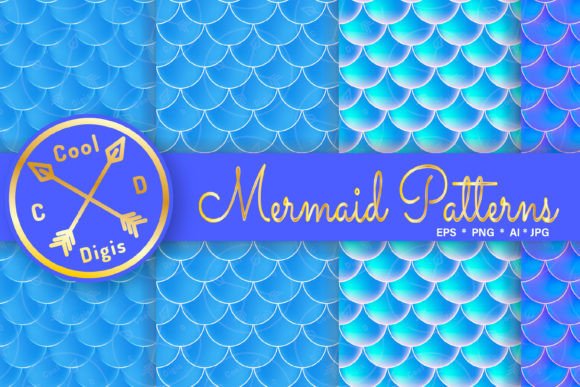
The Mermaid Scales Blue Seamless Patterns collection features four distinct variations—all rooted in nautical, ocean-blue color palettes. Think soft aquamarine gradients, deep navy undertones, seafoam highlights, and pearlescent accents. Unlike generic blue patterns, these are intentionally calibrated for depth, dimension, and visual harmony—ensuring your printed invitations don’t look flat, and your web backgrounds feel immersive.
Why Seamless Patterns Matter (Especially in Digital Design)
In today’s digital-first world, seamless patterns are more than aesthetic flourishes—they’re functional assets. Consider how often you encounter repeating textures: website headers, social media banners, planner undated pages, t-shirt prints, or even sublimated tote bags. A non-seamless image would show harsh lines or misaligned edges when tiled—a telltale sign of amateur design.
This collection solves that problem with precision. Each of the four patterns comes in two complementary formats:
- Raster Files (JPEG & PNG): High-resolution 12″ × 12″ (3600 × 3600 pixels) at 300 dpi RGB—perfect for scrapbooking, printable party decorations, greeting cards, cupcake toppers, and digital planners.
- Vector Files (AI & EPS): Fully editable, scalable, and resolution-independent—ideal for fabric printing, custom apparel, signage, embroidery digitizing, or sublimation workflows.
Because vectors retain clarity at any size—from tiny label stickers to 48″ wall decals—you’ll never sacrifice quality for scale.
Real-World Uses You Might Not Expect
While many assume seamless patterns are only for paper crafts, this collection shines far beyond scrapbooks. Here’s how creators are putting it to work:
- Small Business Branding: Use the patterns as subtle background textures in logo mockups, business card designs, or Shopify store banners—adding thematic cohesion without overwhelming the message.
- Educational Materials: Teachers print ocean-themed worksheets, classroom borders, or student reward certificates—making learning visually engaging and on-brand.
- Print-on-Demand Products: Upload vector files directly to platforms like Printful or Gelato to produce mermaid-scale baby onesies, swimwear, reusable shopping bags, or phone cases—no design overhead required.
- Digital Planners & Canva Templates: Layer PNGs over Notion dashboards or integrate them into Canva templates for themed monthly spreads, habit trackers, or mood journals.
- Event Styling: Create cohesive wedding stationery suites—from save-the-dates to table numbers—or design custom confetti, favor tags, and photo booth backdrops for under-the-sea-themed birthdays.
Technical Notes Every User Should Know
To get the most from this collection, it helps to understand a few practical considerations:
- Software Requirements: Raster files work in any image editor (Photoshop, GIMP, PaintShop Pro). Vector files require vector-editing software—Adobe Illustrator, CorelDRAW, Inkscape, or Affinity Designer. Beginners can start with free tools like Inkscape or Photopea.
- Sublimation Readiness: While the vector files are optimized for heat-transfer applications, successful sublimation depends on your printer model, ink type, substrate (e.g., polyester fabric vs. ceramic mug), and heat press settings. Always run test prints first.
- Color Accuracy: RGB values may appear differently across monitors. For critical color matching (e.g., brand-aligned merchandise), convert to CMYK before commercial printing—and request a physical proof from your vendor.
- Licensing Clarity: This is a digital download, not a subscription. Once purchased, you own perpetual usage rights for personal and commercial projects—no royalties or attribution required. However, resale of the files themselves (as-is or rebranded) is prohibited.
Common Misconceptions—Debunked
Myth: “Seamless patterns are just for crafters.”
Truth: They’re essential infrastructure in graphic design—from UI/UX interfaces (think subtle background textures in mobile apps) to architectural visualization (textured walls or flooring).
Myth: “If I don’t own Adobe software, I can’t use vector files.”
Truth: Free, open-source alternatives like Inkscape handle AI/EPS files seamlessly—and many online services (like SVGOMG or CloudConvert) let you convert vectors to web-friendly SVG or PNG formats.
Myth: “Blue patterns all look the same.”
Truth: These four designs vary in scale density, directional flow (horizontal ripple vs. vertical scale alignment), and tonal contrast—giving you intentional variety for different applications.
How to Get Started—Even If You’re New
You don’t need years of design experience to begin. Start simple:
- Download & Unzip: Extract both ZIP folders—raster and vector—to your desktop.
- Test One File: Open a JPEG in your preferred photo editor. Resize it to fit a standard 5″ × 7″ card layout and add text using a clean sans-serif font.
- Try Tiling: In Photoshop or GIMP, use the “Offset” filter (Filter > Other > Offset) to preview how the pattern repeats—confirming seamless continuity.
- Explore Vectors: Open an EPS in Inkscape. Use the “Ungroup” command to isolate individual scale elements—then recolor one section to match your brand palette.
- Print a Sample: Print a 4″ × 4″ swatch on cardstock. Hold it up to natural light—notice how the subtle gradients mimic light refracting through water.
That tactile moment—seeing your design come alive—is where digital meets delight.
Final Thoughts: More Than Just Pretty Pixels
Mermaid Scales Blue Seamless Patterns represent something deeper than trend-driven aesthetics. They reflect a growing demand for versatile, ethical, and sustainable creative resources. No physical waste. No shipping emissions. Instant access. And because they’re built for reuse—across products, platforms, and purposes—they support circular design thinking.
Whether you’re crafting heartfelt birthday cards for a child’s mermaid party, launching a boutique line of ocean-themed baby clothes, or designing a calming digital wellness planner—the underlying principle remains the same: great design should empower, not complicate. With thoughtful structure, technical integrity, and oceanic inspiration, this collection does exactly that.
So go ahead—download, experiment, repeat. Let every scale tell a story. And remember: in the world of digital creation, the most powerful tool isn’t software or hardware—it’s the intention behind what you make.