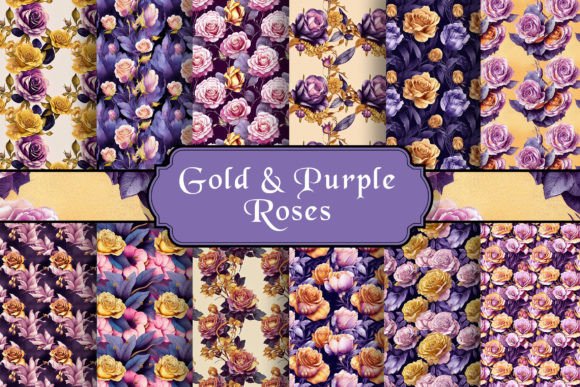
Gold Roses Patterns PNGs
If you’ve ever searched for elegant, versatile floral design assets—especially ones that shimmer with sophistication without overwhelming your layout—you’ve likely landed on Gold Roses Patterns PNGs. These aren’t just decorative roses. They’re a curated set of high-resolution, transparent-background resources built for real-world use: print-ready notebooks, social media banners, digital planners, scrapbook kits, and even branded merchandise. What makes them stand out isn’t just the metallic warmth of gold—it’s how thoughtfully they’re engineered for flexibility, clarity, and compatibility.
What You’re Actually Getting (and Why It Matters)
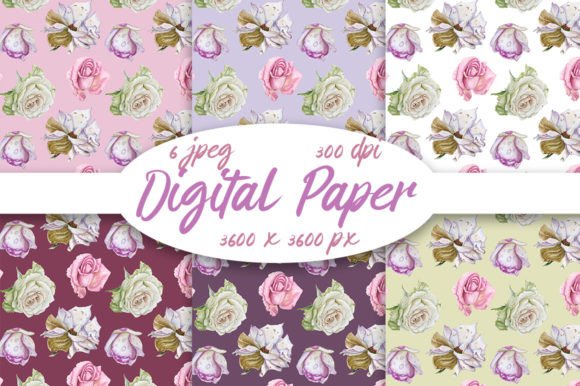
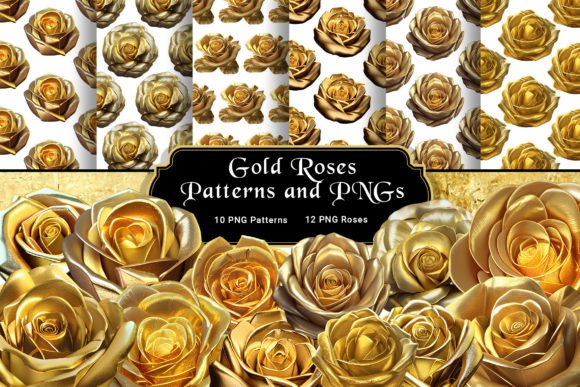
Each purchase includes 10 seamless gold rose patterns and 12 individual gold rose clipart elements, all delivered as high-res PNG files at 3600×3600 pixels and 300 dpi. That resolution ensures crisp detail whether you’re printing a 24″×36″ poster or scaling a single rose to fill an Instagram story background. The transparent background isn’t just convenient—it’s essential. It means no awkward white boxes, no color-matching guesswork, and no extra time spent erasing backgrounds in Photoshop or Canva.
Crucially, these files are not JPEGs or low-res web images masquerading as “print-ready.” They’re true raster assets optimized for professional workflows—compatible with Adobe Illustrator (when placed), Photoshop, Affinity Designer, Procreate, Cricut Design Space, and even free tools like GIMP or Photopea. That broad compatibility matters more than most buyers realize—especially if you switch between devices or collaborate with others using different software.
A Common Mistake: Assuming “High Res” Means “Ready for Everything”
Many creators assume that because a file is labeled “high resolution,” it will behave predictably across all uses. But resolution alone doesn’t guarantee usability. For example: a 300 dpi image at only 1000×1000 px may look sharp when printed at 3″×3″, but pixelate badly on a full-page journal spread. Worse, some sellers list “300 dpi” while delivering compressed, upscaled, or watermarked files—often discovered too late, after hours of design work.
With Gold Roses Patterns PNGs, the 3600×3600 px dimension gives you real headroom. You can scale down for web use without losing fidelity—or enlarge confidently for large-format prints. But here’s the practical tip: always open one pattern in your preferred software *before* building a full layout. Check how it tiles (seamless patterns should repeat without visible joins), test transparency against several background colors, and verify layer blending works as expected—especially if you plan to overlay text or adjust opacity.
Overlooking File Structure—and Paying for It Later
Another frequent oversight? Not checking how the files are organized. Some bundles dump dozens of similarly named PNGs into one folder—“rose_01.png”, “rose_02.png”, “pattern_gold_rose_v2.png”—with no naming logic or visual index. That leads to wasted time hunting for the right variant, accidental duplication, or misusing a detailed clipart element where a subtle pattern would serve better.
The Gold Roses Patterns PNGs collection avoids this by grouping patterns and cliparts separately, with clear, descriptive filenames (e.g., “gold-rose-vine-pattern-seamless.png”, “gold-rose-bud-clipart-transparent.png”). No guessing. No renaming needed. This small detail saves hours over multiple projects—especially if you maintain asset libraries for client work or recurring brand templates.
Misjudging Compatibility: When “JPG-Compatible” Isn’t Enough
The description notes compatibility with any software that recognizes JPG formats—but PNG support goes beyond basic import. Some apps (especially older versions or mobile-first tools) handle transparency inconsistently. A rose might appear with a gray checkerboard in preview but render with a black halo when exported. Others flatten layers silently, removing your ability to recolor or adjust individual petals.
To avoid surprises: test one clipart in your target workflow *before* committing to a full design. In Canva, for instance, drag the PNG onto a blank canvas and try changing the background color beneath it—does the gold retain richness, or does it dull? In Silhouette Studio, import and check if the cut lines align cleanly with the edges. If you’re prepping for print-on-demand, upload a sample to your POD platform’s mockup generator first. These quick checks prevent rework—and preserve the delicate luminosity gold tones depend on.
Why “Download Immediately” Is More Than a Convenience
Instant download isn’t just about speed—it’s about control. When you buy design assets, you’re investing time as much as money. Waiting for email delivery, navigating clunky license portals, or hitting download limits mid-project adds friction that breaks creative flow. With Gold Roses Patterns PNGs, you get direct access after purchase—no logins, no delays, no expired links. That immediacy becomes especially valuable during tight deadlines, live workshops, or classroom demos where students need consistent, identical assets.
Just make sure your device has enough storage before downloading (the full set is under 150 MB, but high-res PNGs add up). And save a backup copy outside your downloads folder—preferably in a cloud-synced folder labeled with the date and license type. It’s a small habit that pays off when you revisit a project months later and need the exact same rose arrangement—not a similar one from another source.
What to Verify Before You Use Them
Before applying any of these to client work or public-facing content, take two minutes to review:
- Licensing scope: These are for personal and commercial use—including merch, digital products, and social posts—but not for reselling the PNGs themselves as standalone assets.
- Color accuracy: Gold renders differently across screens. View the files on both a calibrated monitor and a mobile device to confirm warmth and contrast meet your brand standards.
- Pattern scale: Seamless doesn’t mean “one-size-fits-all.” Try tiling a pattern at 50%, 100%, and 150% scale in your layout—some designs shine at subtlety; others command attention at larger sizes.
- Clipart versatility: Notice how many elements include isolated stems, buds, and open blooms. That variety lets you build custom bouquets instead of relying on single motifs.
You don’t need advanced skills to use Gold Roses Patterns PNGs well—just awareness of what they are, what they’re designed to do, and where common assumptions fall short. When you match the right pattern to the right context—say, a soft vine motif for notebook headers, or a bold single rose for a podcast cover—you’re not just decorating. You’re reinforcing tone, elevating perception, and communicating care through detail.
That’s the quiet power of gold roses done right: not flashy, not fussy—just consistently useful, beautifully rendered, and ready when you are.